DSD Teams Shouldn't Have to Choose Between Speed and Accuracy
Direct Store Delivery is the most time-pressured workflow in field sales. Your drivers have 30–50 stops a day, each one a negotiation between what's on the truck, what the store wants, and what Business Central knows.
When your mobile app can't talk to BC — or worse, requires connectivity to function — everything slows down. Drivers write orders on paper. Invoices are posted hours later. Inventory counts drift. Cash gets reconciled at end of day from memory.
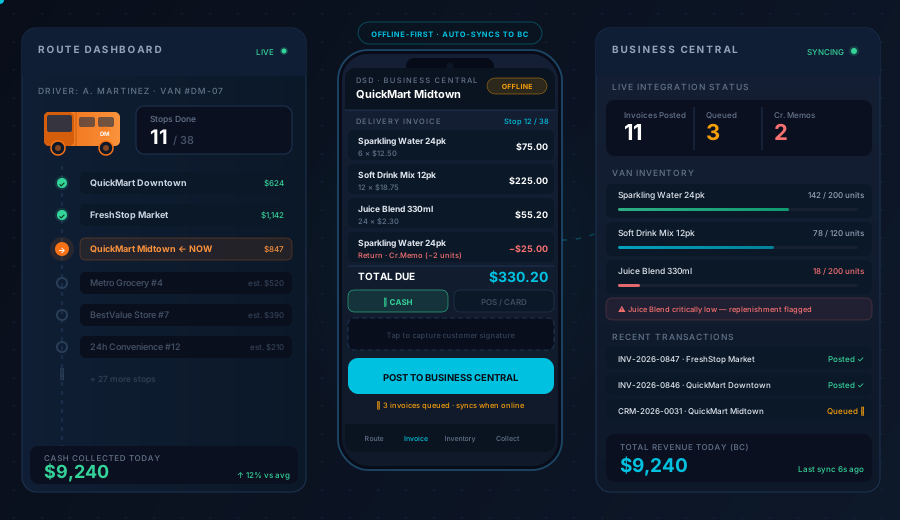
Dynamics Mobile closes the gap. Every stop is executed in the app — delivery, invoice, payment, return — and posted directly to Business Central the moment connectivity is available. No double entry. No lag. No lost transactions.
Built for Every Moment of the DSD Day
✅ Native BC connector — customer ledger, pricing, inventory, and invoices live in Business Central; the app is the execution layer
✅ Offline-first van inventory — load van at depot, track deliveries, partial drops, and returns throughout the day without connectivity
✅ On-the-spot invoicing — generate and deliver sales invoices by Bluetooth printer, email, WhatsApp, or Viber before leaving the store
✅ Multi-method payment collection — cash, cheque, and card with instant digital receipts
✅ Live supervisor view — see every driver's location, route progress, and stop status in real time
How a DSD Day Works with Dynamics Mobile
1. Load & Dispatch — Start the Day Right
Supervisors plan routes the evening before. The app pulls customer agreements, delivery windows, and van capacity from Business Central and builds optimized routes automatically.
At depot, drivers confirm van loading in the app — quantities, lot numbers, expiry dates. Stock is committed against their route, visible to the warehouse team in real time.
📦 Van inventory committed from BC warehouse locations
🗓️ Route order optimized by geography, delivery windows, and priority
📋 Pre-trip checklist: vehicle condition, temperature logs, special handling notes
📲 All customer data, pricing, and history synced to device before departure
2. Execute at Every Stop — Deliver, Invoice, Collect
The driver arrives. The app shows the planned order, customer history, outstanding balance, and any special instructions — all visible offline.
The driver confirms what was actually delivered (quantities may differ from the planned order), handles substitutions, and processes any returns. The invoice is generated instantly.
🔖 Barcode scanning for fast product confirmation and return processing
📝 Flexible delivery: full drop, partial, substitution, or delivery refusal — all captured with reason codes
🧾 Invoice printed via Bluetooth or sent digitally — customer signs on-screen
📍 Geofencing validates the driver is physically at the delivery address before the visit can start
💳 Payment collected on the spot — cash counted and confirmed, cheque photographed, or card tapped
📸 Photo evidence for damaged goods, refused deliveries, or compliance documentation
3. Sync & Close — Business Central Always Up to Date
When the driver reconnects — even briefly between stops — the app syncs automatically. By the time the route is done, Business Central is fully up to date.
📤 Sales invoices posted to BC customer ledger automatically
📦 Van inventory decremented; returns posted to BC return location
💰 Payment entries created against customer accounts — no manual reconciliation
📊 Supervisor dashboard shows route completion, revenue collected, and exceptions — before drivers return
Van Inventory — The DSD Detail Most Apps Get Wrong
Most field sales apps treat inventory as a lookup. Dynamics Mobile treats it as a live ledger.
Scenario | How Dynamics Mobile Handles It |
|---|
Full delivery as planned | Inventory decremented, invoice posted |
Partial delivery | Remaining quantity noted, partial invoice issued |
Customer substitution | Different SKU delivered, invoice adjusted in-app |
Return / rejection | Return captured with reason code, posted to BC return bin |
Damaged goods | Photo captured, write-off posted, supervisor notified |
Lot / batch / expiry tracking | Scanned at load, confirmed at delivery, full traceability |
All movements post to Business Central with the correct document type, date, and location. No batch reconciliation at end of day.
What Makes This Integration "Native" to Business Central?
Not all BC integrations are equal. Dynamics Mobile connects at the data layer — not through a middleware layer or file export.
Customer master — names, addresses, credit limits, payment terms, price groups synced from BC
Item catalog — descriptions, UoM, variants, lot/serial tracking settings from BC item cards
Pricing — customer-specific price lists, trade agreements, and volume discounts resolved in BC and applied offline
Inventory — van locations are real BC bin/location codes; movements post as BC item ledger entries
Sales documents — invoices post as BC sales invoices; returns post as BC sales return orders
Payments — cash and cheque receipts post as BC customer payment journal entries
No middleware required — connects directly to BC OData/API; your BC tenant is always the system of record
Typical BC cloud integration go-live: 3–5 weeks.
Trusted by DSD Operations Across Industries
Dynamics Mobile runs DSD operations in:
🥤 Beverages & FMCG — high-frequency drops, deposit returns, van cooling compliance
🍞 Bakery & Fresh Food — short-dated product management, daily route variation, weight-based pricing
💊 Pharmaceutical — lot traceability, cold-chain documentation, controlled delivery windows
🧴 Consumer Goods — promotional compliance, planogram checks, new product launches
🔧 Industrial Supplies — mixed product types, on-account and COD customers, credit limit enforcement
"Our drivers used to return to depot with a stack of paper invoices. Now everything posts to Business Central during the route — by the time they park, the accounts team can already see the day's revenue."
— Finance Director, Regional Beverage Distributor
"The van inventory tracking sold us. Every lot and expiry date is accounted for from load to delivery. Our auditors love the traceability."
— Supply Chain Manager, Pharmaceutical Distributor
Security & Compliance for Enterprise DSD Operations
DSD apps handle payment data and customer financials. Your IT and finance teams will want assurance.
🔒 ISO 27001 — certified information security management system
🇪🇺 GDPR compliant — EU data residency, data subject rights, DPA available
📋 Full audit trail — every delivery, invoice, payment, and sync event is timestamped and logged
💳 PCI-DSS aligned — card payment flows do not store card data on device
Request the Security & Compliance Packet →
Choose Your Next Step
Book a DSD Integration Demo (30 min)
A focused walkthrough with your specific BC setup and DSD workflow in mind:
Live BC connection with real item catalog and customer data
Route execution demo: load → deliver → invoice → collect → sync
Van inventory tracking and return processing
Supervisor dashboard and real-time route visibility
Integration architecture walkthrough for your IT team
Book a DSD Integration Demo →
Download the DSD Evaluation Pack
Everything procurement and operations need to evaluate Dynamics Mobile for DSD:
📄 DSD solution datasheet (technical + functional)
📊 Feature comparison: Dynamics Mobile vs. common DSD app alternatives
🔒 Security & compliance summary
📋 Implementation and go-live timeline
❓ Sample RFP question set for DSD mobile apps
Download DSD Evaluation Pack →
Frequently Asked Questions
Does it work when drivers have no signal at all?
Yes — completely. The app is offline-first by design. Drivers can complete their entire route — deliveries, invoices, payments, returns — without any connectivity. Data syncs automatically whenever the device finds a signal, even briefly between stops.
How does it connect to Dynamics 365 Business Central specifically?
Via the standard BC API stack (OData v4 / Business Central APIs). No custom BC extensions are required for core DSD functionality. The connector runs as a cloud service that brokers data between BC and the mobile devices. Your BC environment is always the system of record.
Can it handle both on-account and cash customers in the same route?
Yes. Payment terms are pulled from BC customer cards. On-account customers get an invoice with payment due per terms. COD customers are prompted for payment collection before the driver leaves. Mixed routes with both types are fully supported.
What happens if a driver delivers a different quantity than planned?
The driver adjusts the delivery quantity in the app at the stop. The invoice is generated based on actual quantity delivered. The variance is recorded and visible to supervisors in the dashboard. The BC inventory movement reflects the actual quantity, not the planned quantity.
Does it support van-to-van transfers or driver swaps mid-route?
Yes — supervisors can reassign stops between drivers from the supervisor dashboard, and van inventory can be transferred between drivers in the app. All movements post to the appropriate BC locations.
What devices does it run on?
Android — phones and tablets (Android 10+), including rugged devices (Zebra, Honeywell)
iOS — iPhone and iPad (iOS 15+)
Bluetooth peripherals — receipt and invoice printers, barcode scanners, card readers
Still Comparing Options?
We know DSD software evaluation is thorough. No sales pressure here.
If you have specific questions about BC integration architecture, van inventory modelling, or deployment approach — reach out directly. Our solution engineers work exclusively with BC-based DSD operations and will give you a straight answer.
Book a DSD Demo → · Explore Field Sales Solution → · View Integration Guide →