Why Warehouse Teams Still Make Paper-Based Errors in 2025
Most Business Central warehouses run on a painful hybrid: BC as the system of record, paper pick lists printed every morning, and a manual data entry session at the end of each shift to reconcile what actually happened.
The result: inventory counts that are never quite right. Pick errors that don't surface until a customer calls. Lot and expiry tracking that lives on sticky notes. And a BC that's always a few hours behind reality.
The fix isn't more paper or a better spreadsheet. It's giving every warehouse worker a scanner that talks directly to Business Central — so every scan is a BC transaction, and your inventory is always accurate, always live.
What Gets Scanned, What Gets Posted
✅ Receive against purchase orders — scan incoming items, confirm quantities, assign to bin locations, post to BC instantly
✅ Put-away — scan bin barcodes, confirm placement, update BC bin contents in real time
✅ Pick — follow BC-driven pick lists, scan to confirm accuracy, select lots and serial numbers
✅ Pack & ship — verify packed contents, generate shipping documentation, post sales shipment to BC
✅ Transfers — move stock between bins, zones, warehouses, and companies with full BC traceability
✅ Cycle counts & stocktakes — scan bin by bin, count items, post results directly to BC inventory journal
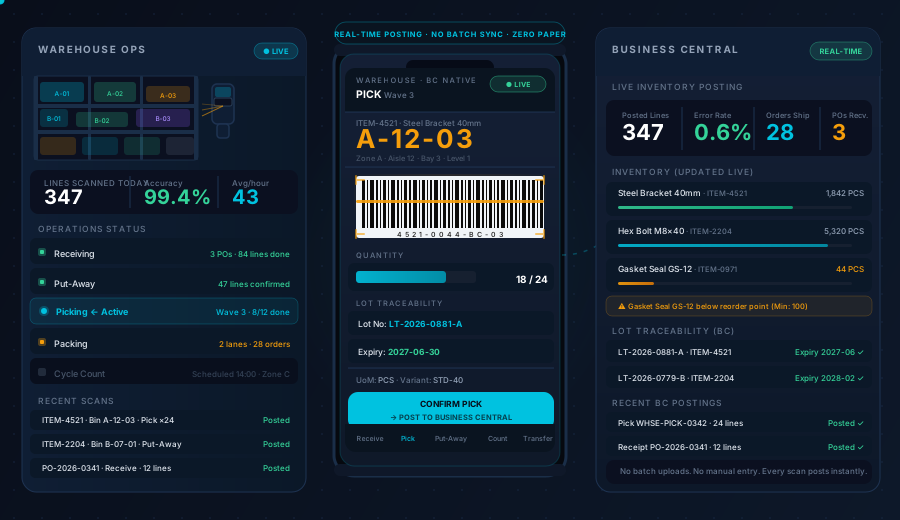
Every action is a live BC transaction. No batch. No upload at end of shift. No reconciliation session.
How It Works
1. Worker Opens a Job — BC Delivers the Task
Pick lists, receive orders, transfer orders, and count sheets don't need to be printed. They appear in the app, pulled live from Business Central, assigned to the worker's device.
📋 Jobs assigned from BC warehouse management or supervisor dashboard
🔍 Worker sees exact item, quantity, lot, bin location, and sequence
📱 Works on Android handheld scanners, phones, tablets, and Windows PCs
🔀 Multiple open jobs visible at once; workers can switch between tasks
2. Scan to Confirm — Every Step, Every Item
Workers scan items and bins at each step. The app validates the scan against the BC job in real time — wrong item, wrong bin, wrong lot — it says so before the mistake propagates.
🔖 Item barcodes — EAN-13, Code 128, QR codes, and custom formats
📦 Bin location barcodes — validate the worker is at the right location before confirmation
🔢 Lot / batch / serial numbers — selected at point of scan, recorded in BC item tracking entries
⏰ Expiry dates — FEFO (First Expired, First Out) rules enforced automatically during picking
⚠️ Error prevention — wrong scan triggers an alert before the worker moves on
3. Post to BC — Instantly, Every Time
No manual posting. No end-of-day reconciliation. Each confirmed scan creates the appropriate BC document entry in real time.
📤 Receives → BC purchase receipt / warehouse receipt
📥 Put-aways → BC bin content updated
🚚 Picks → BC pick worksheet confirmed
📦 Shipments → BC sales shipment posted
🔄 Transfers → BC transfer order lines confirmed
📊 Counts → BC physical inventory journal posted
Supervisors see job progress, worker throughput, and inventory status in the dashboard — updated as workers scan, not at end of shift.
Lot, Batch & Serial Number Traceability — Without the Paperwork
For industries where traceability is non-negotiable — food, pharma, electronics — Dynamics Mobile enforces BC item tracking at the point of scan.
Traceability Requirement | How Dynamics Mobile Handles It |
|---|
Lot selection at pick | Worker prompted to scan or select lot; FEFO enforced if configured in BC |
Serial number tracking | One scan per unit; serial posted to BC item tracking entry |
Expiry date visibility | Displayed during pick and receive; near-expiry alerts configurable |
Catch-weight items | Weight entered at pick or receive; posted to BC in configured UoM |
Receive with multiple lots | Receive line split by lot automatically; each lot tracked separately |
Full traceability report | BC item tracking entries provide end-to-end trace from PO to shipment |
All tracking settings — whether lot, serial, or none — are inherited from the BC item card. No duplicate configuration in the app.
Supported Devices — Including Rugged Industrial Scanners
Warehouse environments are hard on consumer hardware. Dynamics Mobile runs on:
📱 Android — phones, tablets, and purpose-built rugged scanners (Zebra TC-series, Honeywell, Datalogic)
🍎 iOS — iPhone and iPad with compatible Bluetooth barcode scanners
💻 Windows — receiving desks, supervisor stations, and PC-based workstations
Rugged Android devices are the most common choice for warehouse floor use — drop-rated, dust/water resistant, with integrated laser scanners for fast and accurate reads in low-light or high-noise environments.
Multi-Warehouse & Multi-Company — One App, One Login
For businesses operating multiple warehouse locations or legal entities in BC:
🏭 Workers switch between warehouses from the app — no separate login or install
🏢 Supervisors monitor all locations from a single dashboard
🔄 Inter-warehouse transfers handled natively — pick at source, receive at destination
🧾 Inter-company transactions supported — stock movements cross company boundaries with correct BC document flow
🔑 Role-based access — workers only see jobs and warehouses their BC permissions allow
Real-Time Dashboards for Supervisors
Warehouse managers don't have to wait for shift reports. The supervisor dashboard shows:
📊 Live job progress — which picks, receives, and counts are open, in progress, and complete
👷 Worker throughput — items scanned per hour, jobs completed, idle time
⚠️ Exceptions — scan errors, blocked jobs, low-stock alerts, and near-expiry items
📍 Zone activity — which areas of the warehouse are active in real time
📈 Accuracy rates — pick accuracy, receive accuracy, count variance against BC expected
All data driven by live BC transactions — no separate analytics database to maintain.
What "Native Business Central Integration" Actually Means
There are apps that "integrate with BC" via CSV export, middleware, or nightly batch jobs. Dynamics Mobile is different.
Direct API connection — reads and writes via BC OData / standard BC APIs
No custom BC extensions required — core warehouse operations work with standard BC warehouse management setup
Your BC is always the system of record — the app is the execution layer, BC is the source of truth
BC user permissions respected — if a worker doesn't have access to a location in BC, they can't see it in the app
Requires live network connectivity — unlike our field sales app, the warehouse app requires a connection to post transactions in real time (Wi-Fi coverage in the warehouse is expected)
Go-live timeline for a standard BC cloud warehouse: 2–4 weeks.
Trusted in Manufacturing, Distribution & Wholesale
"We replaced printed pick lists and end-of-day data entry with Dynamics Mobile. Pick accuracy went from 96% to 99.7% in the first month. The lot traceability alone justified the cost."
— Warehouse Operations Manager, FMCG Manufacturer
"Our team scans on Zebra TC27 devices. Setup was straightforward — the app just uses our existing BC warehouse configuration. No reimplementation."
— IT Manager, Regional Distribution Company
Security & Compliance
🔒 ISO 27001 — certified information security management
🇪🇺 GDPR compliant — EU data residency, data processing agreement available
📋 Full audit trail — every scan, every posting, every user action logged with timestamp
Get the Security & Compliance Packet →
Ready to See It Live?
Book a Warehouse Demo (30 min)
We'll walk through your specific BC warehouse setup — whether you're using basic inventory, directed put-away and pick, or advanced warehouse management. No generic demos.
Live BC connection with your item catalog and warehouse structure
Full workflow: receive a PO → put-away → pick a SO → ship
Lot tracking and FEFO demonstration
Rugged device options and deployment walkthrough
Book a Warehouse Demo →
Download the Warehouse Datasheet
Technical and functional overview for your evaluation team:
📄 Full feature list with BC version compatibility notes
📊 Supported device matrix (consumer vs. rugged)
🔒 Security architecture summary
📋 Implementation checklist for BC warehouse setup
❓ Common pre-sales questions answered
Download Warehouse Datasheet →
Frequently Asked Questions
Does it require an internet connection in the warehouse?
Yes — unlike our field sales app which is offline-first, the warehouse app requires live connectivity to Business Central. This is by design: real-time posting means your inventory is always accurate, with no risk of sync conflicts. Standard warehouse Wi-Fi coverage is sufficient; cellular fallback is also supported.
Which BC version and licence is required?
Dynamics Mobile works with Dynamics 365 Business Central cloud (SaaS) on current and recent major versions. On-premises BC is supported with a specific connector version. For licence requirements, a BC Essentials or Premium subscription with Warehouse Management enabled is needed. We'll confirm compatibility during the discovery call.
Can it handle multiple units of measure?
Yes. If an item is purchased in cartons and picked in eaches, the app handles both — workers scan in their working UoM and BC receives the transaction in the base UoM as configured on the item card.
What happens if a scanner loses Wi-Fi mid-task?
The app queues the in-progress action and retries automatically when connectivity is restored. Workers see a connectivity indicator and are warned before starting a new job if the connection is lost. For reliable warehouse operations, we recommend adequate Wi-Fi coverage throughout the facility.
Can we label our bins with barcodes and have the app validate them?
Yes — bin location barcodes are a first-class feature. You can print barcode labels for every bin (from BC or from the app), and workers are required to scan the bin label to confirm they're in the right location before posting a movement. This eliminates the most common picking error: right item, wrong bin.
Does it support cross-docking or flow-through operations?
Yes. Cross-dock jobs are driven by BC cross-docking rules — the app presents the cross-dock task to the receiving worker and guides them to the staging area or outbound dock. No separate configuration needed beyond your existing BC cross-dock setup.
Not Sure If It Fits Your Setup?
BC warehouse configurations vary widely — from basic inventory to fully directed advanced warehouse management. We'll tell you honestly whether the app is a good fit, and what BC configuration is needed.
Talk to a Warehouse Solution Engineer → · Explore the Warehouse Solution → · See All Solutions →