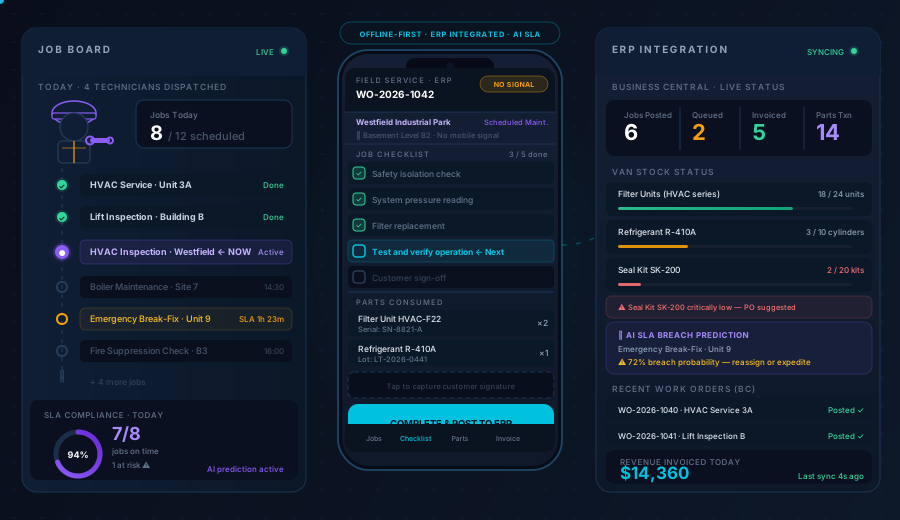
The Two Problems Every Field Service Team Faces
Problem 1: Connectivity gaps kill productivity. Your technicians work in plant rooms, basements, industrial sites, and rural locations where mobile signal is unreliable or non-existent. A field service app that requires connectivity is an app that fails exactly when your team is working hardest.
Problem 2: ERP lag creates billing errors. When job data flows from paper to a back-office admin to the ERP — hours or days later — parts consumption gets misrecorded, invoices go out late, and warranty claims get disputed. Every step away from the source introduces error.
Dynamics Mobile solves both. Offline-first execution means technicians work uninterrupted anywhere. Direct ERP integration means every job, part, and invoice is in your system the moment the device reconnects — no manual re-entry, no lag, no data loss.
What Your Technicians Can Do Without Connectivity
✅ Open and execute jobs — access job details, task checklists, asset history, and customer notes offline
✅ Consume parts from van stock — record parts used per job, tracked by lot/serial/expiry
✅ Capture photos and signatures — document job completion, equipment condition, customer sign-off
✅ Complete smart forms — checklists, safety audits, inspection reports — fully offline
✅ Generate and deliver invoices — issue service invoices on-site by Bluetooth printer, email, or WhatsApp
✅ Collect payments — cash, cheque, or card at job close, with instant digital receipt
Everything syncs automatically to your ERP when connectivity is restored. No technician intervention required.
How a Field Service Day Works
1. Plan — Dispatch the Right Technician to the Right Job
Supervisors start with a full picture: open jobs from the ERP, technician availability, skills, location, and van stock. The app builds optimised routes and assigns jobs — either automatically or with drag-and-drop from the calendar view.
🗓️ Calendar planning — day, week, or month view; drag to reassign and fill gaps
🗺️ Route optimisation — appointment windows, travel time, technician skills, van capacity
🔁 Recurring jobs auto-generated — service agreements create scheduled visits automatically; nothing slips through the cracks
📲 Jobs pushed to device — technicians see their day's assignments the moment they open the app
2. Execute — On-Site, With or Without Signal
When the technician arrives, everything they need is already on the device. Job history, asset service records, parts lookup, task checklists — all synced before departure.
📍 Geofencing check-in — validates the technician is physically on-site before the job can start; eliminates ghost check-ins and protects SLA compliance
🔧 Structured task checklists — step-by-step job workflows defined per service type; required steps enforced before job close
🔖 Barcode scanning — scan parts and assets for fast identification and accurate consumption recording
📸 Photo & document capture — before/after photos, damaged parts, compliance evidence — all attached to the job record
✍️ Digital customer signature — captured on-device at job close; attached to the service record and included in the invoice
📋 Smart forms — safety checklists, equipment inspection reports, parts request forms — completed offline, routed to back office on sync
3. Invoice & Close — Revenue Posted Before You Leave the Site
Job close triggers invoice generation automatically — parts consumed, labour time, and any additional charges assembled from ERP pricing rules. The technician reviews, the customer signs, the invoice is delivered.
🧾 On-site invoice delivery — Bluetooth printer, email, WhatsApp, Viber, or SMS
💳 Payment collection — cash, cheque, or card reader; receipt issued instantly
📤 ERP sync on reconnect — job record, parts consumption, invoice, and payment all post to your ERP the moment connectivity is restored
📊 Supervisor dashboard updated — job status changes to complete in real time; revenue and parts usage visible before the technician drives away
Parts & Van Stock — The Detail That Separates Good FSM Apps from Great Ones
Parts management is where most field service apps let you down. Dynamics Mobile treats van stock as a live inventory ledger — not a lookup table.
Parts Scenario | How Dynamics Mobile Handles It |
|---|
Parts consumed during job | Recorded per job with lot/serial; decremented from van stock |
Parts not available on van | Technician logs requirement; parts request routed to warehouse |
Parts returned (unused or faulty) | Return captured with reason code; posted to ERP return location |
Van replenishment at depot | Replenishment scanned and confirmed; van stock updated in ERP |
Warranty part replacement | Warranty flag applied; billing routed correctly to ERP warranty account |
Lot / serial / expiry tracking | Enforced at point of consumption; full traceability back to purchase |
Everything posts to your ERP with the correct document type. No separate inventory system. No spreadsheet.
ERP Integration — Business Central, D365 F&O, and Beyond
Microsoft Dynamics 365 Business Central
The deepest integration in our platform. Native BC connector — no middleware, no extensions required for core FSM functionality.
Job orders created and updated in BC service/project modules
Parts consumption posts to BC item ledger with lot/serial tracking
Service invoices post to BC sales ledger; customer balance updated on sync
Payment entries post to BC customer payment journal
Service agreements drive recurring job generation in BC
Microsoft Dynamics 365 Finance & Operations
Full connector for enterprise D365 F&O deployments — work orders, project accounting, inventory transactions, and service billing all integrated.
Work order lifecycle managed end-to-end in D365 F&O
Time and expense entries posted to project accounting
Parts consumption to inventory journals with full financial dimension support
Custom & Legacy ERP
Open REST API for connecting to SAP, Oracle, Epicor, Infor, and custom systems. Used by enterprise customers with bespoke ERP environments who need FSM execution capability without replacing their ERP.
Typical integration go-live: 3–5 weeks for BC cloud. 6–10 weeks for F&O or custom ERP.
AI Agents That Prevent Problems Before They Happen
Dynamics Mobile includes an AI agent layer that monitors field operations continuously — not just reporting what happened, but predicting what will.
🔮 SLA breach prediction — monitors job duration and travel time patterns; alerts dispatchers when a job is at risk before the SLA clock runs out
⚠️ Parts consumption anomalies — unusual parts usage per job or technician flagged automatically — catching billing errors, waste, and potential fraud early
📉 Repeat failure detection — identifies assets or customers with high callback rates; surfaces skill-job mismatches for smarter dispatch
🔧 Preventive maintenance signals — cross-references service history with asset age and usage data to generate predictive maintenance recommendations before breakdowns occur
Use Cases
Scheduled Maintenance
Recurring service agreements generate jobs automatically — weekly inspections, monthly maintenance, quarterly overhauls. Technicians arrive with the full maintenance checklist, part requirements, and asset history on device.
Pre-loaded task checklists with required steps and sign-off
Asset service history visible offline
Completion reports generated and delivered on-site
Break-Fix Repair
Emergency and reactive jobs dispatched from the back office and pushed to the technician's device in real time. Technician diagnoses the issue, sources parts from van stock or logs a parts request, and closes the job with a signed service record.
Dynamic job assignment with priority flag
Parts availability check against van stock (offline) or warehouse (online)
Customer notified on job close via email or SMS automatically
Asset Inspections & Compliance
Structured inspection forms with pass/fail criteria, photo evidence requirements, and mandatory sign-off. Results posted to ERP asset records; failed inspections trigger follow-up jobs automatically.
Configurable inspection forms per asset type or regulatory requirement
Photo evidence attached to each inspection line
Compliance report delivered to customer on completion
Field Invoicing
High-value service work invoiced at point of completion — no waiting for back-office processing. Customer receives a professional invoice before the technician leaves, payment collected if required, posted to ERP on reconnect.
Contract rate, parts, and labour assembled from ERP pricing automatically
Customer reviews and approves on device before invoice is issued
Invoice stored in central register for back-office audit
Who Uses Dynamics Mobile for Field Service
Industry | Typical Use |
|---|
Manufacturing | Machinery maintenance, equipment repair, compliance inspections |
Utilities & Energy | Infrastructure inspection, meter reading, asset lifecycle management |
HVAC & Building Services | Planned maintenance contracts, reactive callouts, compliance certification |
Pharmaceutical | Equipment qualification, validation records, cold-chain inspection |
Food & Beverage | Refrigeration maintenance, hygiene inspections, equipment calibration |
IT & Technology | On-site hardware support, installation, and configuration |
What Customers Say
"Our technicians used to fill in paper job sheets and hand them to admin at the end of the week. Now the job is in Business Central — with parts, time, and the customer's signature — the moment they close it on-site. We invoice the same day."
— Head of Service Operations, Industrial Equipment Manufacturer
"We evaluated five field service apps. Only Dynamics Mobile could demonstrate true offline operation on our plant sites where signal is zero. That was the decision."
— IT Director, Utilities Services Company
Security & Compliance
🔒 ISO 27001 — certified information security management
🇪🇺 GDPR compliant — EU data residency, DPA available on request
🔑 Azure AD / Entra ID SSO — integrated with your Microsoft identity environment
📋 Full audit trail — every job action, signature, sync event, and payment timestamped and logged
📄 Document register — every invoice, report, and form issued from the field stored centrally for audit
Get the Security & Compliance Packet →
Two Ways to Get Started
Book a Field Service Demo (30 min)
A focused session on your specific ERP, service type, and team size:
Live job workflow: dispatch → on-site execution → invoice → ERP sync
Offline demonstration — app running with no connectivity, then reconnect and sync
Parts and van stock management walkthrough
Smart forms and inspection workflow
AI agent capabilities for your use case
Book a Field Service Demo →
Download the Field Service Datasheet
Everything your technical and operational evaluation team needs:
📄 Full feature list (functional + technical)
📊 ERP integration matrix (BC, D365 F&O, custom)
🔒 Security architecture overview
📋 Implementation timeline by ERP type
❓ Field service-specific RFP question set
Download Field Service Eval Pack →
Frequently Asked Questions
What does "true offline mode" actually mean?
It means technicians can complete an entire job — including parts consumption, smart form completion, photo capture, customer signature, and invoice generation — without any mobile signal. The app stores everything on-device and syncs automatically when connectivity is restored. It is not a read-only cache or a "view jobs offline" feature. Full execution, fully offline.
Which ERPs does it integrate with?
Natively: Microsoft Dynamics 365 Business Central and Microsoft Dynamics 365 Finance & Operations. Via open REST API: SAP, Oracle, Epicor, Infor, and custom ERP systems. If you're running a less common ERP, tell us during the discovery call — we'll give you an honest assessment.
Can it handle service contracts with SLA targets?
Yes. Service agreements in the ERP define response times and resolution targets per customer or asset tier. The app displays SLA status on the job card, and the AI agent layer monitors active jobs against SLA thresholds — alerting dispatchers before a breach occurs, not after.
What if a technician needs a part that isn't on the van?
The technician logs a parts request directly from the job in the app. The request is routed to the warehouse for picking and dispatch. The technician can continue with other tasks while the part is sourced, or schedule a return visit — all tracked against the original job record in the ERP.
Does it support multiple technicians working on the same job?
Yes — multi-technician jobs are supported. Each technician has their own device and records their own time and parts. Job completion requires all assigned technicians to confirm their tasks before the job can be closed. All contributions are posted under the single job record in the ERP.
Can customers book or track their own service jobs?
The field service app itself is a technician and supervisor tool. For customer-facing self-service (job booking, status tracking, history), our Customer Portal solution provides a web and mobile interface that integrates with the same ERP data.
Questions Before You're Ready to Demo?
Our field service solution engineers work exclusively with ERP-integrated FSM deployments. If you have specific questions about offline architecture, ERP connector depth, or device recommendations for your environment — reach out directly.
Book a Field Service Demo → · Explore the Solution →